

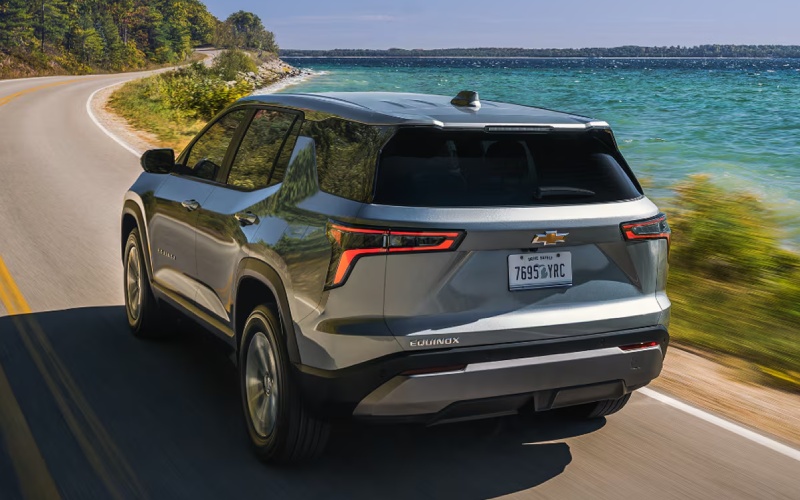
Jay Hatfield Chevrolet – What Makes the 2027 Chevrolet Equinox a Smart Tech SUV for Joplin, MO Shoppers?
Technology can make a compact SUV feel easier to drive, simpler to organize and more enjoyable every day. For shoppers comparing the 2027 Chevy Equinox around Joplin, MO, the question often centers on whether the SUV’s technology is truly useful or simply impressive on paper. Chevrolet designed the Equinox with a cabin that places essential digital tools front and center, led by a personalized 11.3″ diagonal infotainment touchscreen, seamless OnStar* connectivity plus Apple CarPlay®* and Android Auto™ compatibility.
The result is a compact SUV that feels current without becoming complicated. Drivers can access apps, music, maps and messages through a large display, while voice commands help keep attention focused on the road. That matters for daily life around the Four States area, where drivers may be moving between work, school, errands, appointments, and weekend plans. Jay Hatfield Chevrolet, serving Miami, OK, Joplin, MO, and Parsons, KS, helps shoppers understand how these systems work so the technology feels familiar before the first drive home.
Why the 11.3″ Touchscreen Matters
The 11.3″ diagonal infotainment touchscreen is one of the strongest reasons the Equinox stands out for technology-focused shoppers. Size matters because a larger screen can make menus, maps, and audio information easier to read at a glance. Chevrolet describes the display as personalized and engaging, and that focus is important. Rather than forcing drivers to dig through layers of controls, the system is built around quick access to the information most people use during a drive.
For Joplin-area shoppers, this can be especially helpful when moving between city streets, highway stretches, and smaller surrounding communities. A clear map display can simplify route changes, while easy audio and phone controls can make errands feel less scattered. The system supports Apple CarPlay®* and Android Auto™ compatibility, so many drivers can use familiar smartphone interfaces instead of learning everything from scratch.
Connected Convenience Inside the Cabin
Good vehicle technology should reduce friction. The Equinox supports that goal with available wireless phone charging*, helping compatible smartphones stay powered without extra cord clutter. OnStar* connectivity adds another layer of support, and Google built-in is also part of the technology story Chevrolet highlights for Equinox. Together, these elements help the cabin feel more integrated and less dependent on separate devices.
Shoppers who use a vehicle as a mobile command center will appreciate how these features support normal routines. A morning commute, a lunch break errand, an after-school pickup and an evening appointment can all require different directions, phone calls or audio choices. The Equinox helps keep those tasks accessible from one central display.
Helpful Technology to Look For During a Test Drive
When evaluating the Equinox, a test drive should include more than acceleration and ride comfort. Take time to use the technology as if you already owned the SUV. Pair a phone if possible, open navigation, test voice commands, and see how quickly the display responds to normal inputs. A vehicle can have a long list of features, but the real value comes from how naturally those features fit your habits.
- Touchscreen layout: Check whether common menus are easy to find and read from the driver’s seat.
- Smartphone integration: Test Apple CarPlay®* or Android Auto™ compatibility with your own device.
- Voice commands: Ask for directions, music, or a call to see how the system responds.
- Charging options: Ask about available wireless phone charging* and confirm device compatibility.
- Driver information: Review how vehicle settings and alerts are displayed while driving.
After working through these items, consider how the Equinox would feel during a busy week. The strongest technology features are the ones you do not have to think about constantly. When a system is intuitive, it quietly supports the drive rather than taking attention away from it.
How Safety Tech Complements Infotainment
The Equinox technology story is not limited to entertainment and connectivity. Chevrolet also equips the SUV with over 15 standard safety and driver assistance features*, including Chevy Safety Assist*. This package includes Automatic Emergency Braking*, Front Pedestrian Braking*, Lane Keep Assist with Lane Departure Warning*, Forward Collision Alert*, Following Distance Indicator* and IntelliBeam®.
These systems are designed to support awareness in common driving situations. For example, Forward Collision Alert* and Following Distance Indicator* can help drivers monitor traffic ahead, while Lane Keep Assist with Lane Departure Warning* can provide assistance in certain lane-drift situations. IntelliBeam® can automatically manage high beam use depending on surrounding traffic conditions. Safety or driver assistance features are not a substitute for attentive driving, but this level of standard support is valuable for shoppers who want a compact SUV with confidence-enhancing technology built in.
Which Equinox Model Fits Tech-Focused Shoppers?
LT, RS and ACTIV each bring a different personality to the Equinox lineup. LT offers a strong foundation with the 1.5L turbo engine, heated front seats and steering wheel, the 11.3″ diagonal infotainment touch-screen and available HD Surround Vision. RS adds a sportier look with black mirrors, moldings, emblems and badging, standard 19″ wheels, available 20″ machined wheels and an available two-tone Black roof. ACTIV leans into an adventure-ready style with all-terrain tires, uniquely tuned suspension, Evotex and sueded microfiber seating surfaces, and an available two-tone white roof.
For technology-focused buyers, the best model depends on which features matter most beyond the central touchscreen. Some shoppers may prefer LT for its well-rounded equipment, while others may be drawn to RS styling or ACTIV capability. Available HD Surround Vision is worth asking about if parking visibility and low-speed maneuvering are high priorities.
Frequently Asked Questions:
Is the Equinox touchscreen easy to use while driving?
The 11.3″ diagonal infotainment touchscreen is designed to provide a large, personalized display for engaging infotainment. During a test drive, shoppers should try the menus, voice commands, and smartphone integration to confirm the layout feels natural.
Does the Equinox support Apple CarPlay®* and Android Auto™ compatibility?
Yes. Chevrolet lists Apple CarPlay®* and Android Auto™ compatibility as part of the Equinox technology experience, helping drivers access familiar apps, music, maps and messages through the vehicle display.
Can I get wireless phone charging?
Available wireless phone charging* can help compatible devices stay charged while on the go. Ask about availability by trim and equipment package when comparing models.
Does the technology help with safety?
Yes. Beyond infotainment, Equinox includes over 15 standard safety and driver assistance features*, including Chevy Safety Assist*. These features can support awareness, although the driver must remain attentive and responsible at all times.
For Joplin, MO shoppers who want a compact SUV with meaningful technology, the Equinox makes a strong case. Its large touchscreen, smartphone compatibility, available wireless charging, OnStar connectivity, and standard driver assistance features work together to create a cabin that feels modern and practical. The best next step is to compare trims, sit inside the vehicle and use the technology firsthand. Once the system is in front of you, it becomes clear how well the Equinox is built for connected daily driving.
Request more 2027 Chevrolet Equinox information
Connect with us


Recent Blog Entries
- Why Miami, OK Drivers Trust the 2026 Chevrolet Silverado 2500 HD for Confident Fifth-Wheel and Jobsite Hauling
- Smart Cargo and Everyday Tech for Miami, OK Drivers — A Closer Look at the 2026 Chevrolet Trailblazer
- Hands-On Touring Comfort in the 2026 Chevrolet Traverse — A Parsons, KS Road-Ready Guide
- What Makes the 2027 Chevrolet Equinox a Smart Tech SUV for Joplin, MO Shoppers?
- Is the 2026 Chevrolet Silverado 2500 HD Better Than the 2026 Toyota Tundra for Towing near Joplin, MO?